Cross-validation and group-cross-validation in INLA
Zhedong Liu (zhedong.liu@kaust.edu.sa)
Dec 2023
AA-group-cv.RmdWe present examples to illustrate the use of leave-group-out cross-validation (LGOCV) in INLA. The first example demonstrates the primary function used to compute the LGOCV, while the second example introduces additional features. For more advanced examples, please refer to (Adin et al. 2023).
Let us assume that we have collected repetitive measurements of the weights of some rats with measurement errors. We denote each measurement as , and each is associated with the ID of the corresponding rat, denoted as . For the purposes of our analysis, we have simulated the data according to a true model. Specifically, we have simulated data for 10 rats, each with 10 measurements. We then plot the vector against the group ID for each measurement.
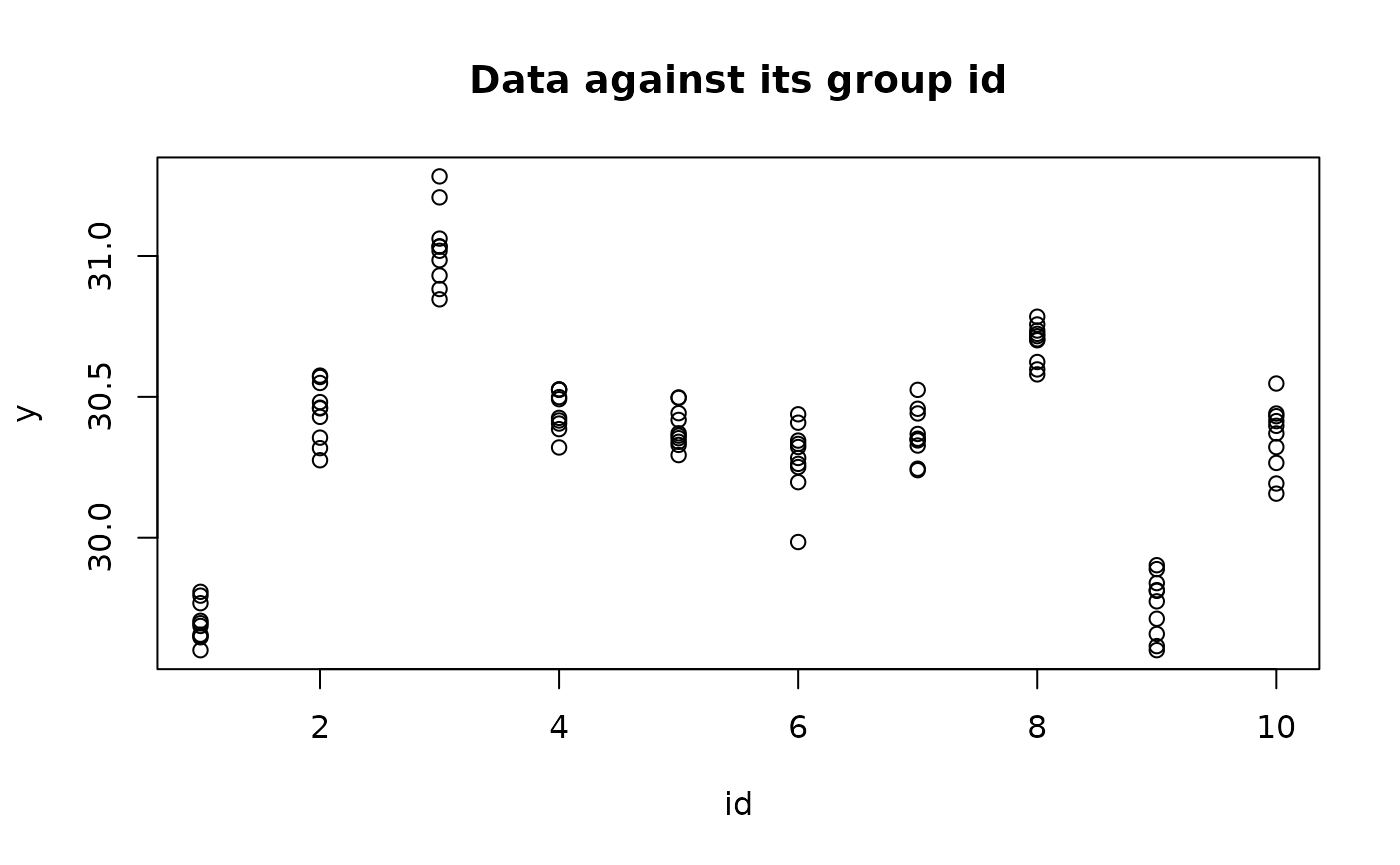
We can fit a multilevel model to the data and use it to make two types of predictions. The first prediction is to estimate the weight of another measurement from rat one, while the second prediction is to estimate the weight of a measurement from another rat. In INLA, there is no separate predict function for making predictions. Instead, predictions are made as a part of the model fitting process itself. Since making predictions is essentially the same as fitting a model with some missing data, we can simply set y[i] = NA for those locations for which we wish to make predictions.
data = data.frame(y = c(y,rep(NA,n_rat+1)),id = c(id,1:n_rat,n_rat+1))
formula = y ~ 1 + f(id,model = "iid")
res = inla(formula = formula,
           data = data,
           family = "normal"
           )
We present the predictive densities for the two prediction tasks below, which are given by where each prediction task is associated with a specific .
##
## this example needs to be fixed so it does not depend on the removed
## inla.likelihood* feature
##
res = inla(formula = formula,
           data = data.frame(y = c(y,rep(NA,n_rat+1)), id = c(id,1:n_rat,n_rat+1)),
           family = "normal",
           control.compute = list(config = TRUE,likelihood.info = T)
           )
nconfig = res$misc$configs$nconfig
weights = unlist(lapply(1:nconfig,FUN = function(i){res$misc$configs$config[[i]]$log.posterior}))
weights = exp(weights)/sum(exp(weights))
eps = 0.001
q = seq(eps,1-eps,eps)
preddensity = vector(mode = "list",length = n_rat+1)
for(rat_idx in c(1,11)){
    predictor_idx = n + rat_idx
    mode_idx = which.max(weights)
    args = INLA:::inla.likelihood.parser(res$misc$configs$config[[1]]$arg.str[1])
    for(mode_idx in mode_idx){
        args$theta = res$misc$configs$config[[mode_idx]]$theta[1]
        mode_eta_mu = res$misc$configs$config[[mode_idx]]$Predictor[predictor_idx,"mean"]
        mode_eta_sd = sqrt(res$misc$configs$config[[mode_idx]]$Predictor[predictor_idx,"variance"])
        eta_eval = mode_eta_mu + seq(-5,5)*mode_eta_sd
        args$linear.predictor = eta_eval
        qfunc = inla.likelihood(type = "q",args)
        y_eval = c()
        for(i in 1:length(q)){
            y_eval = c(y_eval,qfunc(q[i]))
        }
    }
    y_eval = sort(y_eval)

    preddensity_conditional = list(mode = "list",length = nconfig)
    preddensity[[rat_idx]]$y_eval = y_eval
    preddensity[[rat_idx]]$density = numeric(length(y_eval))
    for(config_idx in 1:nconfig){
        args$theta = res$misc$configs$config[[config_idx]]$theta[1]
        preddensity_conditional[[config_idx]] = inla.lik.pred(y_eval,
                                                  args = args,
                                                  eta.mean = res$misc$configs$config[[config_idx]]$Predictor[predictor_idx,"mean"],
                                                  eta.sd = sqrt(res$misc$configs$config[[config_idx]]$Predictor[predictor_idx,"variance"])
                                                  )
        preddensity[[rat_idx]]$density  = preddensity[[rat_idx]]$density +  weights[config_idx]*preddensity_conditional[[config_idx]]
    }
}
plot(preddensity[[1]]$y_eval,preddensity[[1]]$density,
     main = "Predictive Density of A Measure from Rat 1",
     xlab = "weight",
     ylab = "density",
     type="l")
plot(preddensity[[11]]$y_eval,preddensity[[11]]$density,
     main = "Predictive Density of A Measure from An Unobserved Rat",
     xlab = "weight",
     ylab = "density",
     type="l")
To evaluate the accuracy of the first prediction, we can use LOOCV with a logarithmic utility. The LOOCV logarithmic utility can be expressed as:
To assess the quality of the second prediction, we can use leave-group-out cross-validation (LGOCV), where the group includes all measurements from a particular rat. The LGOCV logarithmic utility can be expressed as: Here, represents the indices of data points from the same rat. We can compute and using the inla.group.cv function.
loocv_res = inla.group.cv(result = res)
ULOOCV = mean(log(loocv_res$cv[1:n]))

groups = lapply(1:n,FUN = function(i){which(id == id[i])})
lgocv_res = inla.group.cv(result = res,groups = groups)
ULGOCV = mean(log(lgocv_res$cv[1:n]))

print(paste0("ULOOCV is ", round(ULOOCV,5),"."))
print(paste0("ULGOCV is ", round(ULGOCV,5),"."))
[1] "ULOOCV is 0.83438."
[1] "ULGOCV is -0.56665."In the previous code, we manually provided the groups. However,
inla.group.cv also has the ability to automatically
construct groups for LGOCV. This method was described in a preprint by
(Liu and Rue 2022). Using this automatic
method, the resulting groups are the same as the manual ones we provided
earlier. The extra data points
does not have effect on the result since
is NA.
lgocv_auto_res = inla.group.cv(result = res,num.level.sets = 1)
ULGOCV_auto = mean(log(lgocv_auto_res$cv[1:n]))
print(paste0("ULGOCV_auto is ", round(ULGOCV_auto,5),"."))
print(paste0("The group for data point 1 is:"))
print(paste(lgocv_auto_res$groups[[1]]$idx,collapse=" "))
[1] "ULGOCV_auto is -0.56665."
[1] "The group for data point 1 is:"
[1] "1 2 3 4 5 6 7 8 9 10"The automatic construction of the groups is based on the posterior
correlation coefficients of linear predictors. The parameter
num.level.sets controls the degree of independence between
and
.
Higher num.level.sets means higher independence between
and
.
We use a small example to illustrate the meaning of
num.level.sets = 3. If
contains the correlation of all
to
,
we construct the group for
using the following procedure.
num.level.sets = 3
# We intentionally create some replicated correlations since it is not rare to have
#|corr(eta_i,eta_j)| == |corr(eta_i,eta_k)|, where j != k.
C_i = c(1,1,0.9,0.9,0.8,0.8,-0.1,-0.1,0,0)
# L_i contains the correlation levels.
L_i = sort(unique(abs(C_i)),decreasing = T)
# Now we construct I_i
I_i = c()
for (l in 1:num.level.sets){
  I_i = c(I_i,which(abs(C_i) == L_i[l]))
}
print(paste(I_i,collapse=" "))
[1] "1 2 3 4 5 6"We have multiple weight measurements for several rats denoted by , each with an associated rat id , and a covariate associated with each measurement but not with the rat.
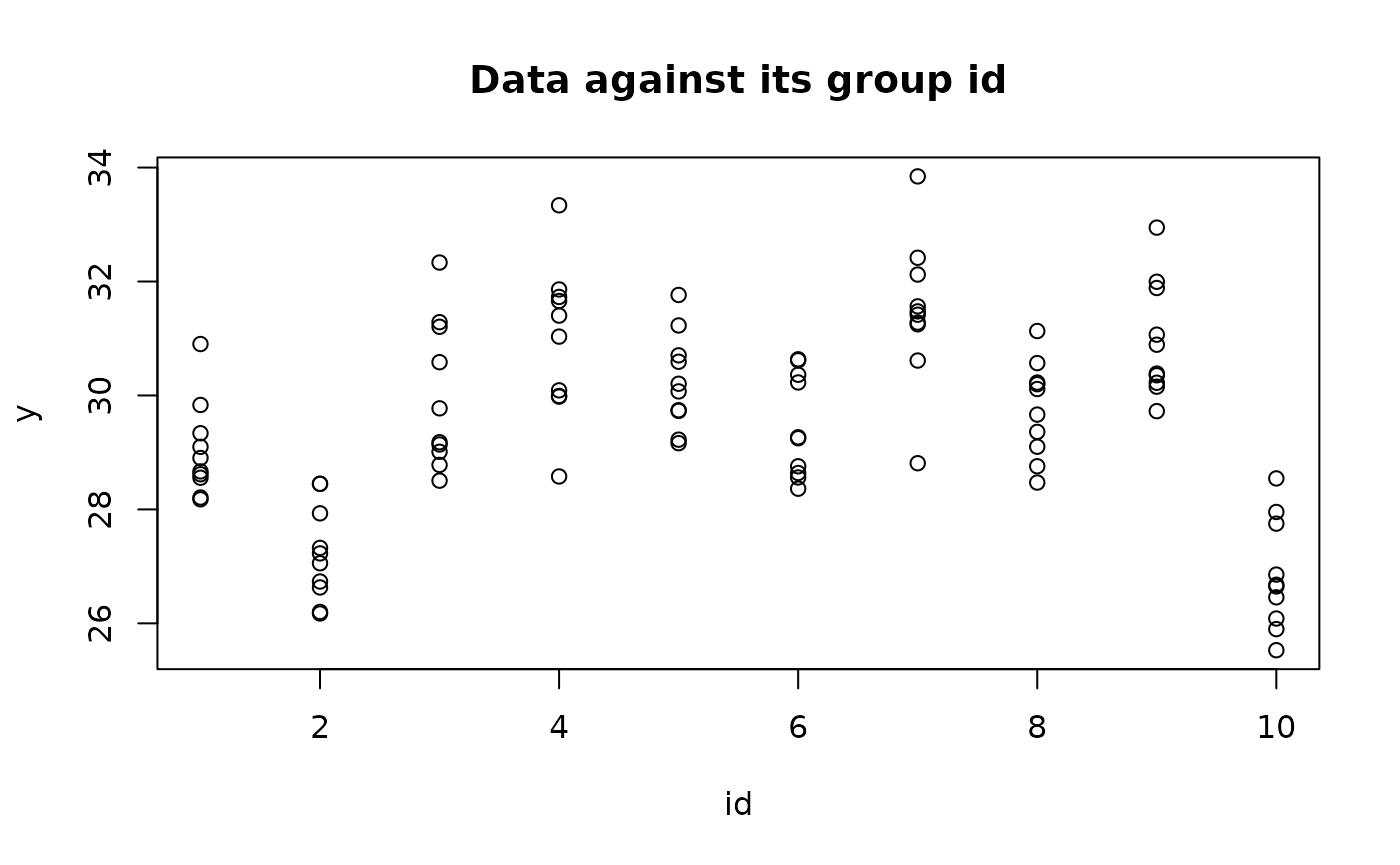
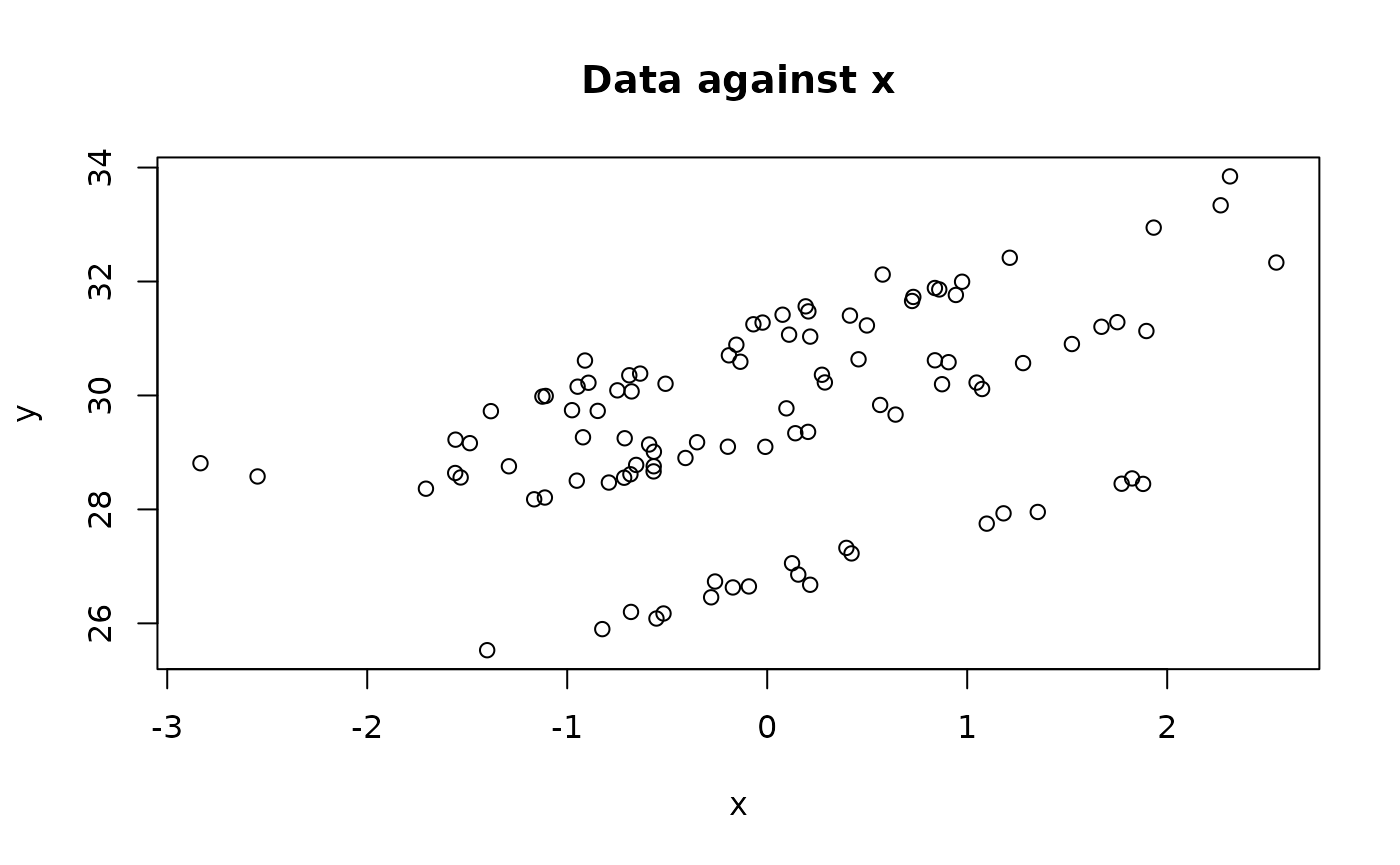
We fit a multilevel model with random intercepts and random slopes.
data = data.frame(y = y,id = id,id2 = id,x = x)
formula = y ~ 1 + x + f(id, model = "iid") + f(id2, W = x,model = "iid")
res = inla(formula = formula,
           data = data,
           family = "normal",
           control.compute = list(config = TRUE,likelihood.info = T)
           )
We want to compare two models: one with random slopes and one without
random slopes. To ensure that we have the same groups for the different
models, we can pass an inla.group.cv class object to
inla.group.cv function. Here is an example:
We first fit the model without random slopes.
formula_alt =  y ~ 1 + x + f(id, model = "iid")
res_alt = inla(formula = formula_alt,
           data = data,
           family = "normal",
           control.compute = list(config = TRUE,likelihood.info = T)
           )
If we want to use the groups constructed by the full model to compute LGOCV, we have the following code.
lgocv_res = inla.group.cv(result = res,num.level.sets = 1)
lgocv_res_alt = inla.group.cv(result = res_alt,group.cv = lgocv_res)
We check the result using automatic groups construction. We first check the group for data point 1, 2 and 3.
lgocv_res = inla.group.cv(result = res,num.level.sets = 1)
print(paste(lgocv_res$groups[[1]]$idx,collapse=" "))
print(paste(lgocv_res$groups[[2]]$idx,collapse=" "))
print(paste(lgocv_res$groups[[3]]$idx,collapse=" "))
[1] "1"
[1] "2"
[1] "3"The groups are different from the manual group. The reason is that
the posterior correlation of the linear predictors considering all the
effects including the linear effects and the iid effects.
The manual group is formed based on the prior information of the
iid effect. We can pass the message to the automatic
construction through keep option, which should work with
strategy = "prior". That means we construct groups using
prior correlation with only effects specified by the arguments
keep.
lgocv_res = inla.group.cv(result = res,num.level.sets = 1,strategy = "prior",keep = "id")
print(paste(lgocv_res$groups[[1]]$idx,collapse=" "))
print(paste(lgocv_res$groups[[2]]$idx,collapse=" "))
print(paste(lgocv_res$groups[[3]]$idx,collapse=" "))
[1] "1 2 3 4 5 6 7 8 9 10"
[1] "1 2 3 4 5 6 7 8 9 10"
[1] "1 2 3 4 5 6 7 8 9 10"In some applications, we may not want to iterate over the whole data
set. A typical scenario is that we are working on a very large data set.
To select a subset as our testing points, we can use select
arguments in inla.group.cv. Here is an example. We only
want to have
th
data point and
th
data point as our testing points.
lgocv_res = inla.group.cv(result = res,num.level.sets = 1,select = c(12,53))In this way, we only compute quantities related to and .
If we are using manual groups construct we only need to specify the groups for th and th data point.
groups = vector(mode = "list",length = n)
groups[[12]] = which(id==id[12])
groups[[53]] = which(id==id[53])
lgocv_res = inla.group.cv(result = res,groups = groups)
To speed up the computation speed, inla.group.cv
computes
,
where
is the mode of
.
In order to compute
,
we need to enable the control.gcpo option while fitting the
model, which is in control.compute. The result are stored
in res$gcpo in the same format as the output of the
inla.group.cv. Here is the example code.
control.gcpo = list(enable = TRUE,num.level.sets = 1)
res = inla(formula = formula,
           data = data,
           family = "normal",
           control.compute = list(control.gcpo = control.gcpo,config = TRUE)
           )
In the outputs of inla.group.cv, we have access to mean
(lgocv.res$mean) and standard
deviation(lgocv.res$sd) of a Gaussian approximation of
.
With this we can compute any scoring rules, which is a function of the
observed data
and the predictive density
.
The predictive density can be computed by the integral:
where the likelihood
is given by the model and the posterior is contained in the outputs.
If we want to also integrate out the uncertainty of the hyperparameters, we need to compute where is computed using . (Liu and Rue 2022) The location of each component is organized in the following list:
is contained in
res$misc$configs$config[k]$log.posterior.
The correction term is contained in
res$misc$configs$config[[1]]$gcpodens.moments[,"log.theta.correction"].
The mean of is contained in
res$misc$configs$config[[1]]$gcpodens.moments[,"mean"].
The variance of is contained in
res$misc$configs$config[[1]]$gcpodens.moments[,"variance"].
As an example, we compute the Continuous Ranked Probability Score (CRPS) and present its definition. Suppose is a random variable with cumulative distribution function , and let be the observed value. The CRPS is defined as: where is the indicator function that takes the value 1 when and 0 otherwise.
To evaluate the non-parametric predictive density, we obtain samples by first sampling from , then sampling , and finally obtaining samples of the predictive density by sampling from . With the samples of the predictive density, we can compute its empirical cumulative function to evaluate . The following code demonstrates this process:
control.gcpo = list(enable = TRUE,num.level.sets = 1,strategy = "prior",keep = "id")
res = inla(formula = formula,
           data = data,
           family = "normal",
           control.compute = list(control.gcpo = control.gcpo,config = TRUE)
           )
# 1. choose the testing point
testing.point = 1
y_observed = y[testing.point]
# 2. get the hyperparameter density
nconfigs = res$misc$configs$nconfig
weights = unlist(lapply(X = 1:nconfigs,
    FUN = function(config.idx){
    res$misc$configs$config[[config.idx]]$log.posterior
    + res$misc$configs$config[[config.idx]]$gcpodens.moments[testing.point,3]
    }))
weights = exp(weights)/sum(exp(weights))
#3. get samples of y_i|y_{-I_i},theta
n = 1e6
n_theta = as.numeric(rmultinom(n = 1,size = n,prob = weights))
y_sample = c()
for(config.idx in 1:nconfigs){
    if(n_theta[config.idx]>0){
        eta = rnorm(n_theta[config.idx],
            mean = res$misc$configs$config[[config.idx]]$gcpodens.moments[testing.point,1],
            sd = sqrt(res$misc$configs$config[[config.idx]]$gcpodens.moments[testing.point,2]))
         sd = sqrt(1/exp(res$misc$configs$config[[config.idx]]$theta[1]))
         y_sample_config = rnorm(n = n_theta[config.idx],mean = eta,sd = sd)
         y_sample = c(y_sample,y_sample_config)
    }
}
#4 We can use y_sample to compute the empirical cumulative function then evaluate CRPS
F_y = function(y){sum(y_sample<=y)/n} #inefficient but straightforward...
yy = seq(min(y_sample)-10,max(y_sample)+10,0.01)
FF = unlist(lapply(yy,F_y))
CRPS = pracma::trapz(yy,(FF-(yy>=y_observed))^2)